
 .com
.com
Website Planet is the web’s premier hub for individuals and businesses seeking to create, promote, or expand their online presence.
Website Planet provides authoritative reviews, in-depth comparisons, accessible guides, and powerful tools to help you achieve your digital ambitions.
We recently had the pleasure to discuss with Luka @website planet about email marketing. Here is the link to the discussion.
In this article we cover some key challenges faced by small and mid-sized businesses doing email marketing.
We provide insights for dealing with the following issues:
- Audience: building and maintaining an email list
- Content: creating engaging newsletters
- Deliverability issues
- Analyzing and understanding data
- Compliance with regulations
- Additional challenges
You can read the complete article here.
This new update for nuevoMailer ESP introduces Google reCaptcha v3 as an option for opt-in forms.
The coming 3rd party cookie restrictions which Chrome has already started to apply make the current captcha method inapplicable in some cases.
This is a problem especially for ESPs since your users want to put their opt-in forms in their own websites.
Therefore in 4.1 the current captcha method was updated (using partitioned cookies) and Google reCaptcha v3 comes as a new alternative, another option.
Read about all the new developments in nuevoMailer ESP v.4.1 here.
By definition and as the name implies autoresponders come as a response after an event has occurred. Such an event is for example sign-up to a list.
With nuevoMailer you can also create autoresponders that are based on custom subscriber fields of type date and fire before the given date.
The most typical example is Birthdays & Weddings. But it can be any type of anniversary dates or other dates that are very specific to your business (order date, visit date, expiration date and similar).
Here is how it's done:
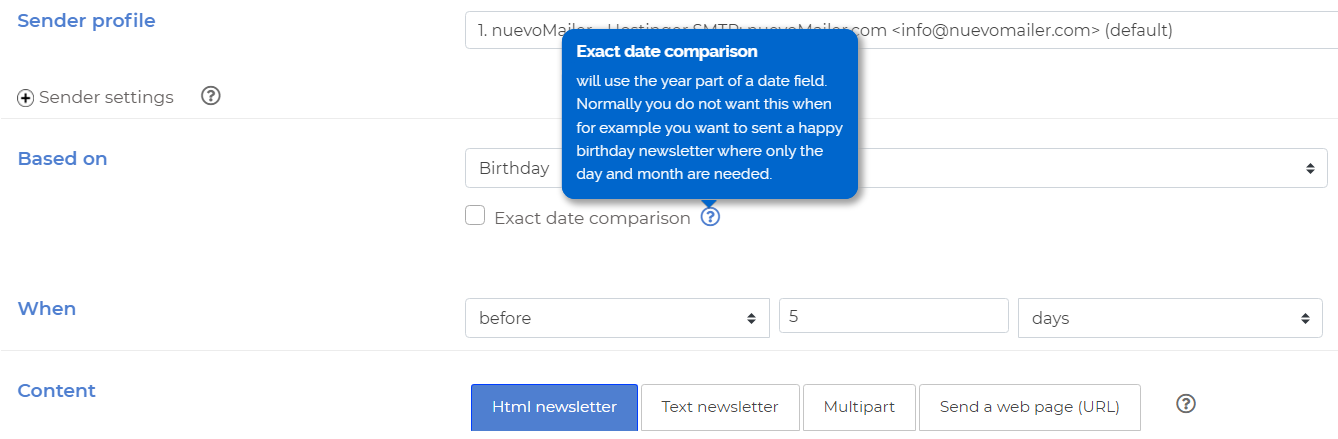
Exact day comparison: how to use
- For anniversaries you should not check this box because you are only interested on the day and month of the event.
- Take the birthday example. You can create an autoresponder that sends a newsletter one week before: "Your birthday is coming - Make your plans now".
- Some examples where you should check this box are the following:
- Order dates, expiration dates, end of support dates, next-visit dates. For such cases you could create an autoresponder with a newsletter like "Your next [appointment] is on 5 days"
Final tip
If you plan to use this feature you should ideally combine it with external database import and synchronization. These articles explain how to import customers and order dates from WooCommerce and Prestashop but the concepts can be applied to any relational databases.
In this simple step-by-step guide you will see how easy it is to add a background image to your opt-in form.
Steps
- Create or find a background image that you like. The image dimensions should be more or less similar to your form's width and height. It is ok and it is better to be larger.
- Upload the image in your assets folder. Tip: use the upload utility you have in your newsletter Html editor:
- Create and save an opt-in form or open an existing one. Go to your opt-in forms page and click this icon:
- Scroll down to this part of the code and add the highlighted code that you see here:
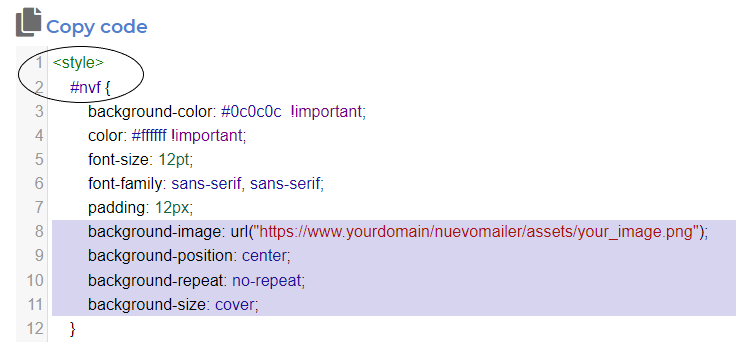
- Adjust the image URL to match your nuevoMailer installation URL and directory. Here are the lines to copy-paste:
background-image: url("https://www.yourdomain/nuevomailer/assets/your_image.png");
background-position: center;
background-repeat: no-repeat;
background-size: cover; - Click the "Update" green button at the bottom of the pop-up window to save your changes.
- Click this icon to view the form:
- Depending on the colors you used you may need to edit your form and choose different colors for your labels, input boxes and other form contents. When you edit a form, custom changes in the code are lost. So open again the pop-up to add the code for the background image.
- For the URL of the background-image and assuming your image is located in the assets folder, you may also use a relative path like this:
background-image: url("../assets/your_image.png");
- Send-Time optimization: using the multi-threaded sending plugin you can send your newsletter at the time when a subscriber is most likely to open or click.
- OpenAI ChatGPT integration. You will need an api key from OpenAI. They have pay-as-you-go plans. You can buy credit for as low as $5 and you will have ChatGPT inside your admin panel.
- Conditional content blocks builder. Makes it easier to build, edit and save blocks.
- Autoresponder improvements and new options. E.g. an AR based on X days-after is always sent at the exact hour you set it on the Xth day.
- Advanced search enhanced with new options and features.
- Read about the new features here.
- See the new demo.
In this post we cover the following topics:
- What are dormant or inactive subscribers
- What is re-engagement and how it is done
- Ideas for re-engagement campaigns and emails
- How to better use nuevoMailer for effective re-engagement and list segmentation.
What is CTOR and how it is calculated.
Different vendors have different ways of measuring CTOR. For example, Litmus defines it in this way:
"The click-to-open rate (CTOR) is how many of your opened emails were clicked on."
We believe this is accurate and we use exactly the same way in nuevoMailer reports.
The CTOR shows what percentage of those who viewed the newsletter clicked at least one link.
In other words we count the "clickers" within the "openers" group.
These groups may vary. The "view or open" of a newsletter can only be captured when the recipient explicitly allows image downloading when viewing the email. In most cases this is enabled by default (at least for subscribers that have you as a trusted sender). But one can still click a link without downloading images.
So with CTOR we focus on those who opened and clicked.
Gmail and Yahoo (AOL) have announced new protection standards and requirements for bulk email senders. In short, they require that you,
- Authenticate your email using DKIM, SPF and DMARC records.
- Enable easy opt-out.
- Ensure you're sending emails your subscribers want.
When?
- Yahoo says 1st quarter of 2024. See blog post with details.
- Gmail by February 2024 but in fact it is already in effect. See blog post with details.
What you should do
- Check your emails for DKIM, SPF and DMARC records. Use a service like Mail tester.
- Check your nuevoMailer activity log for errors.
- Check your email clients report. If you had seen a drop in Gmail then something may be wrong.
- Use Google's postmaster tools.
- With nuevoMailer SB v.9.9 and ESP v.4 you can DKIM-sign your emails. You should only do this if your provider does not give you this option. You can read more on this here.
- New mailing library with new api sending methods and webhook endpoints for Mandrill, Postmark, Mailjet, Mailersend, Brevo.
- Sending domains to be used for DKIM-signing. DKIM-signing is now a built-in feature. See the docs.
- Sidebar widget for the news log along with an extensive redesign. You can read more and experience the widget here. Practically, it became an app on its own similar to those offered by Headway and Beamer (but without the monthly fee).
- A new type of opt-out link that suppresses the subscriber but keeps all history.
- Load, update or add a subscriber directly from your CRM/CMS.
- New methods and options were added to the API related to retrieving statistics, creating campaigns and creating/updating subscribers.
- Numerous improvements and productivity enhancements. There is seriously a lot more to read here.
- See the new demo.
When you land on Mail tester you will see an one-time, temporary email address to copy.
There are two ways to proceed.
- Copy this email address, open an html newsletter and send a single test email to this address.
- Or better, add this email address to your test list and send a campaign to your list.
- Then return to Mail tester and click to check your score.
Gmail will stop accepting your emails if they are not DKIM-signed or without an SPF record. Here is a detailed article on this issue from Spamresource.com.
What you should do
- Check your emails for DKIM and SPF records.
- Check your nuevoMailer activity log for errors.
- Check your email clients report. If you had seen a drop in Gmail then something may be wrong.
- Use Google's postmaster tools.
- With nuevoMailer SB v.9.9 and ESP v.4 you can DKIM-sign your emails. You should only do this if your provider does not give you this option. You can read more on this here.
- Using the snooze option is a great way to retain subscribers.
- Oracle reported an 82% reduction in unsubscribes using snooze.
- Instead of opting out your subscribers can pause receiving emails for some time.
- It is used together with the opt-out reasons you define at sender profile level. Learn more.
Mailing list management is probably the most important process in email marketing. It includes the following activities:
- Collecting & importing various email lists from different sources (customers, prospects, website visitors, leads, contacts).
- Organizing the mailing lists according your communication needs and marketing objectives.
- Segmenting the mailing lists according subscriber preferences, demographic variables, campaign engagement, specific interests and more.
- Maintaining clean & healthy lists by processing bounces, subscriber complaints, opt-outs and removing unresponsive (dormant) subscribers.
nuevoMailer provides you all the tools you need to build, grow and manage your mailing lists effectively. See how.